I/O Board Support

Input Lag: 0.3 Frames *JVS' mode only
JVS' Compatible: Yes
・Added Buttons 7 & 8 per player
・Improved button response times
・Fixed rare issue of phantom button presses for the Test button
Type V Board Support
Send a service request via our Contact Form and include the serial #.
The exA-Arcadia JVS' Type V I/O board is a complete drop in solution for VEWLIX cabinets equipped for JVS or FAST I/O boards.
- Ensure that the cabinet is turned off.
- Disconnect any installed I/O board and remove all wiring & screws.
- Remove the I/O and place the exA-Arcadia JVS' Type V I/O board in its place.
- Proceed to screw in each corner.
- Connect the 60 pin black Hirose connector to J5
- Connect the 4 pin JST NH connector to J4
- Connect the JVS USB Type A connector to J2
- Optionally, connect the 2 pin JST NH connector to J3 for the Game Menu button
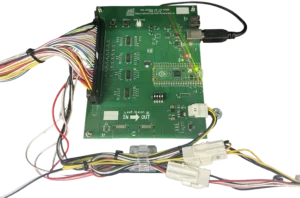
VEWLIX cabinets equipped for the USB I/O board do not have the same wiring as VEWLIX setup for JVS or FAST I/O boards.
Visit the exA-Arcadia Shop to select the correct wiring harness for your cabinet.
A Type A to Type B USB cable that is fully wired (one not for charging) is required.
- Connect the Type B side to the Player 1/2 I/O board.
- Run the USB cable through the back of the cabinet into the back side of the other cabinet.
- Connect the Type A side to the Player 3/4 I/O board.

Connect the 4 pin JST NH connector to J4.
Do not use the micro USB connector to power the I/O board.
Please read the System Support Error page for the IO Error resolution.

Input Lag: 0.3 Frames *JVS' mode only
JVS' Compatible: Yes
・Original Release
Type B Board Support
Send a service request via our Contact Form and include the serial #.
The exA-Arcadia JVS' Type B I/O board is a complete drop in JVS'/JVS solution for blanc cabinets.
- Ensure that the cabinet is turned off.
- Remove the back panel behind the monitor.
- Attach the I/O and secure the exA-Arcadia JVS' Type B I/O board.
- Proceed to screw in each corner.
- Prepare to connect the wiring harness
- Connect the 60 pin black Hirose connector to J6
- Connect the 2 pin JST NH connector to J7
- Connect the 4 pin JST NH connector to J8
- Connect the 6 pin JST NH connector to J9 and the other end to the Service panel behind the control panel service area door
- Connect the JVS USB Type A connector to J1
- Connect the RCA audio connectors from the I/O board to the audio board.
A Type A to Type B USB cable that is fully wired (one not for charging) is required.
- Connect the Type B side to the Player 1/2 I/O board.
- Run the USB cable through the back of the cabinet into the back side of the other cabinet.
- Connect the Type A side to the Player 3/4 I/O board.
Connect the 2 pin JST NH connector to J7.
Do not use the micro USB connector to power the I/O board.
Please read the System Support Error page for the IO Error resolution.

Input Lag: 1 Frame
JVS' Compatible: No
・Original Release
Type N Board Support
Send a service request via our Contact Form and include the serial #.
The exA-Arcadia JVS Type N Link Board is a complete drop in solution for Noir cabinets equipped with the STD CONNECT PCB that does not support JVS linking.
- Ensure that the cabinet is turned off.
- Disconnect the installed STD CONNECT PCB board and remove all wiring & screws.
- Remove the I/O and place the exA-Arcadia JVS Type N Link board in its place.
- Proceed to screw in each corner.
- Connect the 12 pin JST XAD I/O connector to CN2
- Connect the 4 pin JST XH connector to CN3
- Connect the 4 pin JST VH power connector to CN4
- Connect the JVS USB Type A connector to CN5
- Connect the RCA audio cables to the Link Board
Please read the System Support Error page for the IO Error resolution.
Still having issues?
Get in touch with our customer support team for more help. Provide the serial # for each product in your request for the quickest service.
Contact Support